
Days fly by: you always have thousands of things to do, clients are putting you under pressure, your inbox is full… and no matter how many extra hours you put in, nothing seems to improve. We’ve all been there. In fact, it’s easy to spot—either in ourselves or in others—more often than we’d like. In the end…
Days fly by: you always have thousands of things to do, clients are putting you under pressure, your inbox is full… and no matter how many extra hours you put in, nothing seems to improve.
We’ve all been there. And the truth is that it’s easy to see it often in ourselves or in others. More often than we’d like.
In the end it all comes down toproductivity.
In economics, productivity is defined asthe relationship between output and the resources used. In white‑collar work, the output is the result of our labour, which we should not measure by the number of tasks completed (that’s misleading) but by the real impact those tasks have on the business. The resources used are primarily our time and the tools we use (the computer, the phone…).
Since productivity is a ratio between these two factors, like any division there are onlytwo ways to increase it:
- Get more results, or rather, achieve greater impact with the same resources.
- Use fewer resources, that is, in our case reduce the time it takes us to complete tasks.
It’s clear that innate ability is an important factor, but it can’t be included in the formula above. Our natural capacity is what it is, and although we can do things to boost it, in my view,achieving high productivity is more a matter of habits and tools than anything else.
With the same abilities, techniques and habits make a big difference.
Although, modestly, I’ve always considered myself fairly productive, over the years I’ve learned how to improve and become even more so. In this article I’ve summarised some techniques and tips I’ve used for a long time that have always worked very well for me.
Let’s begin!
1. The art of prioritising
Many times we choose which tasks to do for the wrong reasons: because they’re easier, because they’re urgent, because a particular client demands them… All this makes us work a lot, but perhaps on the least appropriate tasks. Getting things done gives us the feeling of progress, but it’s a misleading feeling. It’s doing for the sake of doing.What we should really ask is what value each thing we plan to do has.
First, and even if it’s oft-repeated, the truth is we shouldbe able to distinguish the urgent from the important. We all understand the concept, but in day-to-day life it’s hard to remember and apply it consistently.
You’ve probably seen more than once this famousEisenhower matrix that plots tasks according to their importance and urgency:
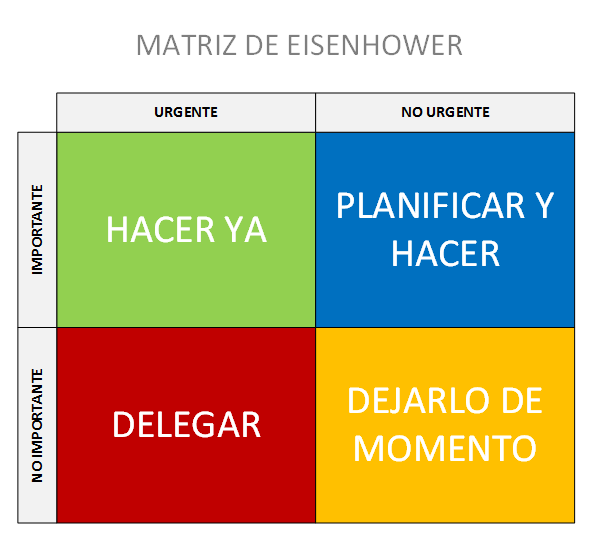
That is,it’s necessary to distinguish between important and urgent. Often the urgent things that make us dash around aren’t actually important. If we can’t tell the difference, we spend the day putting out fires instead of fixing things that have greater impact.
That’s why, if the areas of those squares in the diagram above reflected the distribution of our available time, it should look more like this:
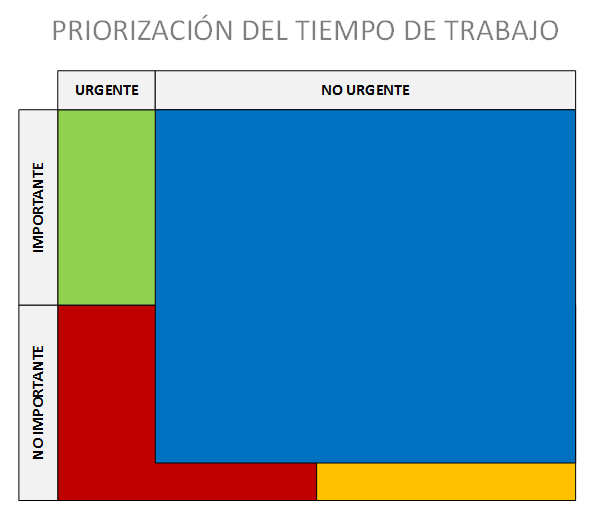
In other words,we should spend the majority of our time on things that are important but not urgent. The urgent and important issues should be few—otherwise we are planning poorly and acting as fire‑fighters putting out fires constantly. Urgent but not important tasks should, if possible, be done by others. And not urgent nor important tasks should occupy a minimum of our time.
When you have a task list in front of you, mentally place each item into those squares. It will help you prioritise much better.
This framework also works to prioritise sub‑tasks within larger tasks. Any task that will take more than a few hours can generally be broken down into several simpler sub‑tasks. These can be prioritised using the same criteria we’ve just seen in order to complete the parent task.
Once we’ve identified which quadrant each task falls into, how do we prioritise the bulk of issues that are important but not urgent?
Well, obviously,the most important first. Naturally. But often the importance of tasks is similar, so it can’t be the only criterion we use.
So, faced with tasks of similar importance, I have severalrules to decide the order in which to tackle them:
- Determine the degree of uncertainty. Many jobs are straightforward: even if they’re time‑consuming, doing them poses no mystery. It’s just getting on with it. Others, however, present uncertainty because we may never have done them before, they’re especially difficult, or their outcome depends on factors beyond our control. They might take a few hours or several days. Tasks with a high degree of uncertainty are the ones we should start with.
- Prioritise the most complicated or least appealing. The natural tendency is the opposite: to begin with the easier or more enjoyable tasks. However, we risk never doing the others when time runs out or willpower fades. If you start with the most tedious ones you’ll have more energy, and once they’re done the rest will feel easy.
- Be more effective with Pareto’s principle. 20% of tasks will deliver 80% of the output. Likewise, probably 20% will account for 80% of the importance of our objectives. These two 20% sets don’t have to coincide, and probably won’t. By identifying the intersection of both sets you can determine the small subset of tasks that will have the greatest impact and also take the most time. Those should be at the top of your plan, along with the previous criteria.
2. Planning

Another very important thing isshort‑term planning. This is the essence of agile project management methodologies, but it’s simply common sense. Once you have tasks prioritised you need to plan them.
For that you shouldtry to estimate roughly how long each task will take (if that’s possible: remember uncertainty). It’s not about getting the minute perfectly right. Justdetermine the order of magnitude: a few minutes, a couple of hours, half a day, a day, several days… so you can fit them into the time slots you have available.
A very useful tool for projects involving several people is theplanning poker technique.
It’s hugely important toset aside time early on Monday to plan the week. Visualise an estimate of the short‑term objectives you’ll try to tackle in the coming days. Then do a shorter session every morning, also early, toplan the day ahead of you.
In each of these small planning sessions you’ll need to correct any estimation mistakes you made previously. Most tasks will have taken more time than expected, others less. Based on that you’ll adjust the plan, also including new items that may have appeared and that you’ll prioritise too.
A useful trick is to block outspecific hours or days of the week for recurring tasks that, although not on the to‑do list, you know are important. For example, calling clients, doing marketing analysis, reviewing results, thinking about business development, studying… If you don’t reserve time for these automatically, you end up never doing them, yet they’re important. So it’s useful to reserve, for example, every Tuesday morning from 10:00 to 12:00 for client calls, or every Thursday afternoon for marketing analysis and some studying. And above all, try to stick to it.If you don’t automatically reserve time for these things you end up never doing them, but they are important. So it’s very useful to set aside, for example, every Tuesday morning from 10:00 to 12:00 for client calls, or every Thursday afternoon for marketing analysis and study. And above all, try to keep to it.
3. Use the right tools
Perhapsthe main quality of the super‑productive professional is being organised. This doesn’t always get the credit it deserves, but it’s crucial.
Therefore, the first tool I recommend is anordered, systematic filing system. If you’re the sort who saves everything on the desktop, you have a problem.
It’s important to have a few top‑level folders on your hard drive where you organise all your information logically. For example, a folder for projects, another for marketing, another for documents, etc. Inside them create sensible subfolders so finding any information is easy. Name files using a simple, consistent system. That way, for example, if you need to find a project for a particular client from 2013 you’ll just go to the folder“Proyectos·Clientes·NombreCliente·2013” and it will be there in its subfolder. The folder and file‑naming criteria should be chosen by you so they make sense. Once you decide, don’t change it, so take time to think it through. It’s pure common sense.
Complementing this,two very useful tools:
- Everything: a tiny program of only around 400KB that once installed can locate any file on your hard drive within a fraction of a second. Type any word, fragment or even advanced search operators and functions. Once you install it you won’t be able to live without it, especially if you handle many thousands of files as I do.
- Dropbox or similar: keep all your files stored in the cloud. You’ll never lose anything again, everything will be accessible from anywhere and you’ll have automatic backups among other advantages. You can even store private information securely with tools like Boxcryptor. If you’re not using something like this you’re making a mistake, even if it doesn’t feel like one. The few dollars a year they cost are worth it for what you get. I recommend Dropbox because it works best for me (and I use several), but Google Drive, OneDrive or similar services will also do. They all have free and paid tiers. I’ve been paying for Dropbox for years and never had a problem.
Oh, and another important thing isdon’t save multiple copies of the same file with small changes between them “just in case” you need them. That can be useful briefly, but there should never be more than a couple of hours in that state or you won’t know which is the correct version. That’s what source control systems likeGit are for—they do exactly that. Don’t be mistaken: not only programmers can benefit from them, and they’re not just for team work.Even if you don’t want the hassle of Git, Dropbox offers version history for all your files, whatever their type, so you can revert when needed. By default it keeps versions for 30 days, but for a few dollars a year you can have permanent, unlimited version history.
The second most important tool is a
task and information management system about those tasks. Forget sticky notes in the diary and use a proper system. Personally I’m a big fan ofTrello and use it for both personal work and collaboration at the company. It’s anorganisation system for tasks based on theKanban methodology, which comes from theLean world of the automotive industry.Its use is extremely simple yet very useful. It consists of a board on which you create a series of columns and, within them, cards that represent your tasks. Within each task you can store everything related to it: images, files, documentation, comments… and you can assign labels to find and classify them better, set due dates, create checklists, link cards together…
For example, this is what my Trello board looks like:
What matters is deciding which columns to create to classify tasks. For example, I use:
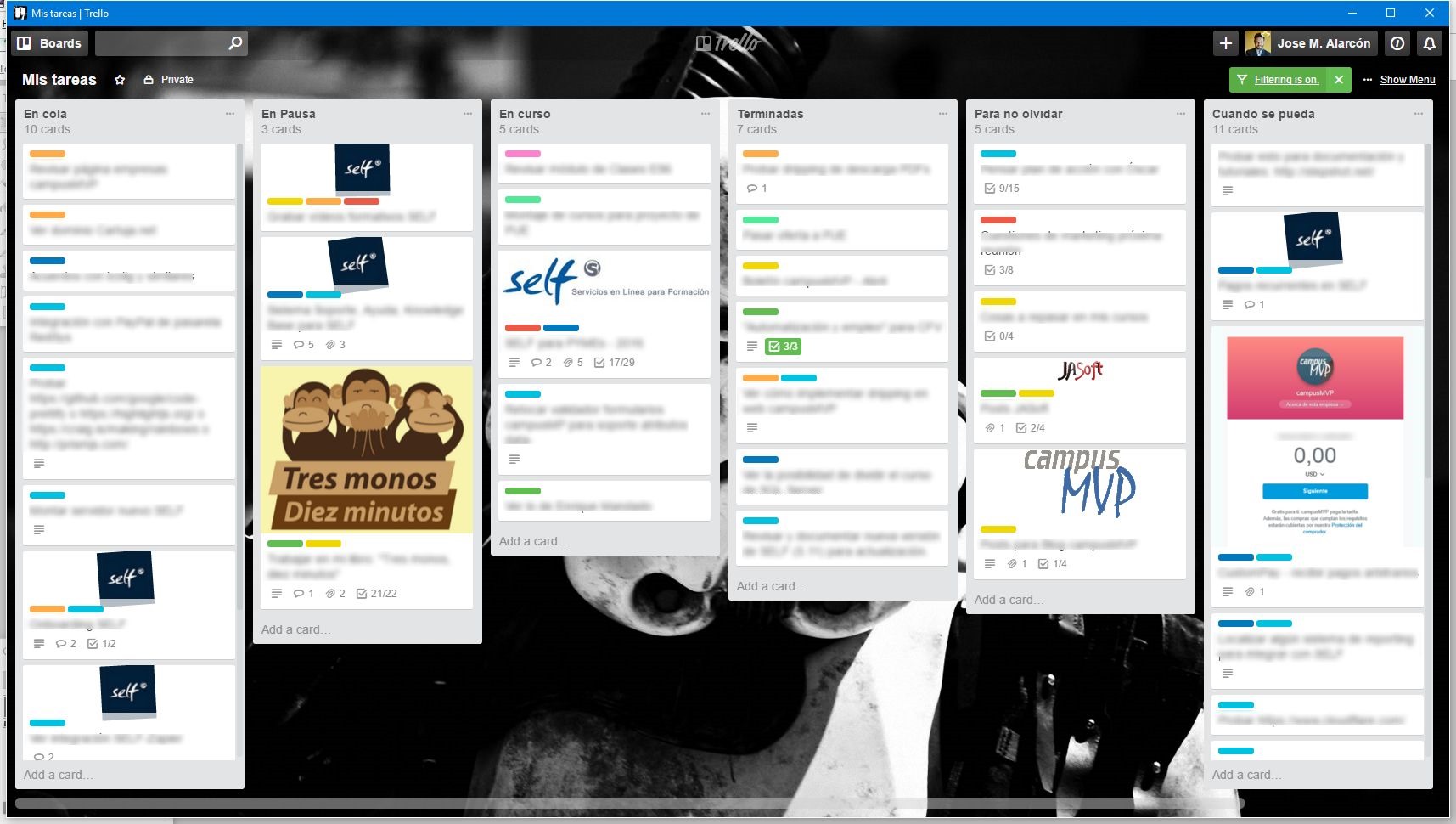
Queued
- : for tasks I’ll do soon, prioritised with the most important at the top, to move them from there into the other columns. These are the tasks from the blue quadrant, the majority—important but not urgent.On hold
- : tasks I’ve started but aren’t currently being worked on because I’m waiting for something or I’ve de‑prioritised them in favour of something more urgent. I don’t move them back to the previous column so I don’t lose sight of them.In progress
- : tasks I’m actively working on. I shouldn’t normally have more than two or three here, although sometimes I add a few short ones to create a bit more pressure.Done
- : I move tasks here as I finish them. This helps create a sense of progress that is very beneficial. Every Monday morning I archive everything in this column to start the week with a clean slate.To remember
- : these are tasks that are neither important nor urgent but I want to keep visible for some special reason. I also take private notes on tasks I do with other people, which are generally from the red quadrant—urgent but not important—and which I usually delegate.When possible
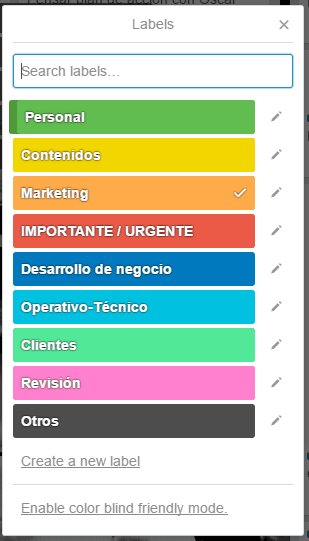
- : these are tasks that are neither important nor urgent (the orange quadrant). Just things that would be good to do someday, but if they don’t get done it’s not a problem. I leave them for dead time or when I feel like doing something with fewer consequences so I can take it easy.Another important thing is choosing useful labels to classify tasks. They’ll help you find tasks visually and in searches, and let you see at a glance what you’re spending your effort on. They’re also useful when integrating Trello with other tools to automate things.
For example, I use these labels:
Trello is a tool designed for collaboration with others, but it’s also very effective for individual use. It’s free, although you can pay a small monthly fee to integrate it with many other services, which is worth it. Many good competitors have appeared. One I like with a more modern interface is
MeisterTask, which are also European and that’s a plus. It’s also free. Another interesting (and European) one isWunderlist, recently acquired by Microsoft. I know it less but I’ve heard great things. Pick one and start using it. You’ll thank me.Other tools you shouldn’t be without in your super‑productive toolkit are:
A calendar
- : use Gmail’s or your email service’s calendar, but make sure it’s online. Sync it with your phone to consult and update it anytime and check free slots when planning the day or week. A very useful complementary tool isCalendly or Doodle , which integrate with your calendar and let you schedule online meetings with clients or collaborators taking your other commitments into account. A note‑taking system
- : likeOneNote or Evernote , both of which have free tiers. It’s important to be systematic and organised when taking notes or you’ll never find anything. These notes aren’t for the tasks you’re working on (that’s Trello or similar) but for ideas, interesting things you read or see, brief reports and cross‑functional documents that might be useful in several contexts. You never know when they’ll come in handy, and when you least expect it you’ll remember you jotted down something useful. Having it stored systematically and easy to find saves time.A read‑it‑later system
- : there’s so much interesting content on the internet! If I read everything I discover each day on social networks or the blogs I follow I’d do almost nothing else. So I’m selective: I read only very short items or things that truly can’t wait. The rest I save for later. I usePocket . It’s a free tool that lets you store and classify web pages for later reading. It integrates with almost everything and you can send items to read later from PC, mobile and many apps. It also generates a readable version of an article, handy on phones and tablets. The paid version is cheap and offers a great feature: it saves articles exactly as they were when you captured them so you can read them later even if they disappear from the web and search within them. If you’re selective about what you archive, documentation for any task becomes much easier. I’ve got hundreds of items stored and classified on marketing, business development, technical articles, psychology, sociology… Highly recommended. It pairs well with a tool likeDiigo which lets you take private and public notes directly on articles to revisit them later. I’m hoping Pocket integrates a feature like this so I can use a single tool for everything. 4. Single‑tasking
People have always admired multitasking. But often you end up trying to fry an egg and iron a shirt at the same time… Except for a few superhumans, most of us are very bad at doing more than one thing at once. So
another golden rule of the super‑productive person is to work on one thing at a time.When you focus on one task, your brain is more engaged and treats it better. Also, when you switch between tasks each context change requires adaptation from your brain and time is lost. If you have three tasks today you’ll finish them sooner if you start with one, finish it and move on to the next, rather than alternating between them. It’s a natural law.
That’s why your Kanban board should never show more than a couple of cards in the “In progress” column.
A good tip is to
group similar but distinct tasks together to do them one after the other. For example, if today’s tasks include reading and replying to email (always), talking to a couple of clients and calling the bank, it’s best to group them consecutively and get them done. They require roughly the same level of attention and the same mental wiring, so they’re good candidates to be done together and reduce the cost of context switching.5. Build temporal barriers
A final very important point to achieve productivity is

blocking distractions and interruptions. To do that you have to build walls around yourself while you work to protect against others’ intrusions and your own.I’ll explain how to build these barriers, but first it’s useful to know a simple yet effective technique: the famous
Pomodoro Technique. It’s simply about reserving work periods during which you must not be interrupted, interspersed with breaks. It sounds trivial, but it’s very effective if you systematise it; all it takes is discipline, although there are small apps for it or even a kitchen timer will do.The original technique suggests 25‑minute intervals with 5‑minute breaks, but I find longer intervals work better for me. Those 25 minutes create too many context changes and are counterproductive in my experience, though yours may differ. I usually work at least an hour straight (often longer), followed by 10–15 minutes when I can do something else. That might be idle browsing on social media or checking the phone, or simply grabbing a coffee, or quickly scanning email for anything urgent. The important thing is to
block all interruptions during the work period you choose.That means
closing email, silencing your phone and notifications (use “Do Not Disturb”), closing the door if necessary, askingnot to be called… I’ve even put a “Do not enter” sign on my door when working on something important. Whatever it takes to avoid distractions during those intense work periods.You can alternate strict Pomodoro periods with looser ones when the phone is on and the door open. And during breaks, get up, leave the room, stretch your legs and even chat with someone.
6. A few more short tips
The previous points are the important ones, but there are many other small things you can do to improve productivity, such as:
Learn to use the keyboard well
- . I don’t just mean typing quickly (though that helps), but using keyboard shortcuts in the operating system and applications you use regularly. It’s amazing how many people use the mouse for everything. Shortcuts are a real shot of productivity. It may be awkward at first, but once you get used to them you can do most things several times faster on a computer. You’ll be surprised. They’re indispensable.Perfection is the enemy of good
- : that’s it. Sometimes knowing when to stop is the best recipe for productivity. You could tweak a design or a text ten more times, but past a certain point no one will notice or appreciate it. Perfectionists (myself included) find this hard, but believe me, you’ll gain a lot by learning to stop.Set deadlines
- : for some kinds of work, if you don’t do this you risk never finishing. Set milestones and deadlines, add a bit of pressure and you’ll get better results.Use email filters and rules
- : another underused feature by many computer users. Just as you classify tasks by urgency and importance, do something similar with email. Create rules so only truly important messages reach your inbox needing your attention. Let the rest be filtered automatically and check it during breaks or in a reserved time slot at the end of the day. For me, the biggest improvement in productivity (and almost in well‑being) in recent years has been achieving “Inbox Zero” every Friday—nothing left in the inbox. It’s an achievable goal.Use two monitors, preferably large ones
- : another small change that can have a big productivity impact. For some tasks you’ll save a lot of time by not switching between windows. Keep related information open on one monitor and do the work on the other. Modern operating systems also support multiple desktops, so you can leave windows open and switch between desktops depending on what you’re doing.Learn to say no
- : only say yes to what’s essential. Again, think in terms of importance and urgency. Saying no to things that aren’t important saves a lot of time. It’s hard, but you learn with practice.Occasionally, waste a little time
- : doing something that relaxes you. I don’t just mean short breaks during the working day as with Pomodoro; sometimes taking an afternoon off if you can afford it can be very productive for your work . Distracting the brain can help boost productivity. But don’t overdo it.
In summary
Increasing our productivity is key to improving at work, in our personal lives and, of course, for the country’s economy.
Beyond the myth of the superhuman who can do the work of ten people,in my view, improvements in this area come more from habits we adopt than from superhuman ability.
With this article I aimed to summarise the techniques, habits and tools that help me. Some are hard at first, but once they become automatic the situation improves markedly.
I hope you find it useful!